
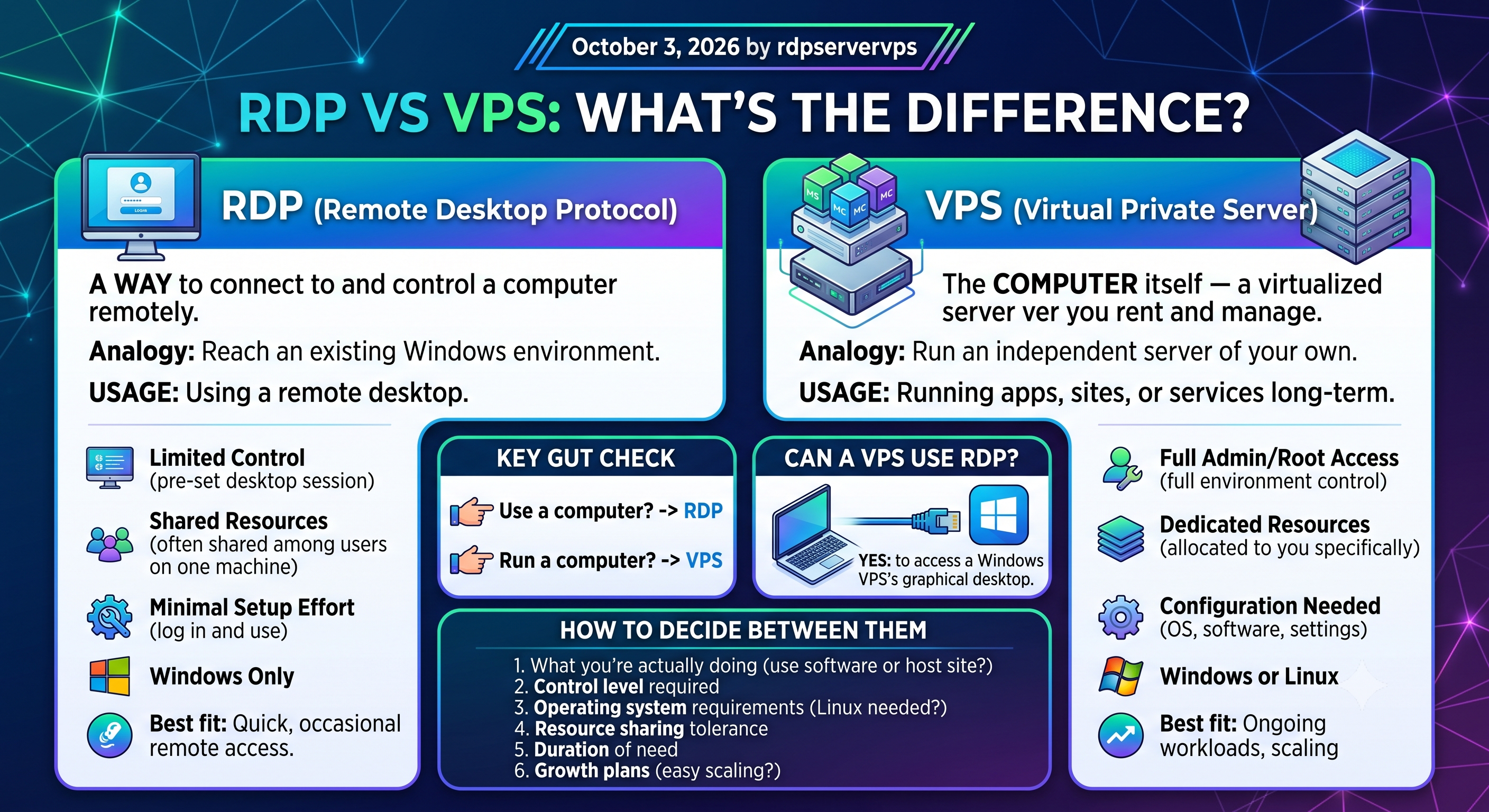
If you’ve been comparing RDP vs VPS and aren’t sure which term applies to what you actually need, you’re not alone — the two get used interchangeably online even though they answer completely different questions. RDP (Remote Desktop Protocol) is a way to connect to and control a computer remotely. A VPS (Virtual Private Server) is the computer itself — a virtualized server you rent and manage as your own. One is a connection method; the other is infrastructure. Which you need depends on what you’re actually trying to do: reach an existing Windows environment, or run an independent server of your own. This guide breaks down how each works, where they overlap, and how to decide between them.
What Is RDP?
RDP, or Remote Desktop Protocol, is a Microsoft protocol that lets you see and control another computer’s desktop over a network connection, as if you were sitting in front of it — your screen, keyboard, and mouse input are encapsulated and encrypted inside the connection (Microsoft Learn). You open an RDP client, enter the address of the remote machine, log in, and get a full graphical desktop.
RDP itself isn’t a server or a piece of hardware; it’s the protocol that carries that session back and forth, and it’s built into Windows for exactly this purpose (Microsoft Learn). The computer on the other end could be a desktop PC in an office, a company workstation, or a virtual machine rented from an RDP hosting provider. What RDP gives you is access to a specific environment someone has already set up, not a blank server you configure from scratch.
What Is a VPS?
A VPS, or Virtual Private Server, is a virtualized slice of a physical server that behaves like its own independent machine. A hypervisor — the software layer that makes this possible — pools a physical server’s resources and allocates them across multiple isolated virtual machines, each running its own operating system (IBM). Unlike shared hosting, where many accounts compete for the same resources, a VPS gives you resources that are allocated to you specifically.
Major cloud providers sell this both ways: a simplified, fixed-price VPS product (for example, AWS’s Lightsail, built for straightforward virtual-server hosting) and a fully configurable virtual machine instance with granular control over compute, storage, and networking (for example, AWS EC2 or Google Cloud’s Compute Engine, which runs VMs on Linux or Windows) (AWS; Google Cloud). Either way, you typically get root or administrator access, meaning you can install software, configure the operating system, and manage it much like a physical server you own (AWS).
How RDP and VPS Actually Work
The clearest way to separate the two is this: a VPS is a destination, and RDP is one way of reaching a destination that happens to run Windows.
A Windows VPS, for example, has RDP available by default so you can log in and manage it graphically — this is exactly how Microsoft documents connecting to a Windows virtual machine on Azure (Microsoft Learn). In that case, you’re using RDP to connect to your VPS — the two work together rather than compete. Confusion creeps in because some providers sell “RDP” as a product in its own right: a pre-configured Windows environment, often shared or sized for lighter tasks, that you access purely through Remote Desktop Protocol without necessarily managing the underlying server yourself. Our Windows RDP guide walks through getting started with one.
So in practice, there are two different things people mean when they say “RDP vs VPS”: comparing the protocol itself to a server (not really a fair comparison), or comparing a ready-made “RDP access” product to a self-managed VPS (a genuine, practical choice). It’s the second comparison that matters for most buying decisions, and it’s what the rest of this guide focuses on.
Key Differences Between RDP and VPS
| Factor | RDP (as a product) | VPS |
|---|---|---|
| What it is | Remote access to a pre-set-up Windows environment | Your own virtualized server |
| Control level | Limited to the desktop session you’re given | Root/admin access to the full environment |
| Operating system | Windows only | Windows or Linux, your choice |
| Resource sharing | Often shared among several users on one machine | Dedicated resources allocated to you |
| Setup effort | Minimal — log in and use it | You configure the OS, software, and settings |
| Scalability | Limited by the plan you bought | Resources can typically be scaled as needs grow (AWS) |
| Best fit | Quick, occasional remote access to a desktop | Running your own apps, sites, or services long-term |
Security Considerations: RDP vs VPS
Both RDP and a VPS can be run securely, but they carry different risks worth knowing about before you decide.
| Area | RDP | VPS |
|---|---|---|
| Main exposure | An exposed RDP port is a well-documented ransomware entry point; attackers scan the internet for open RDP and brute-force weak passwords (CISA; CISA) | Exposure depends on what you run on it — whatever services, ports, and software you install are your responsibility to secure |
| Known vulnerabilities | BlueKeep (CVE-2019-0708), a critical, wormable flaw in older Windows RDP implementations, prompted a rare joint NSA/CISA advisory (CISA; NSA/CISA) | Vulnerabilities depend entirely on the OS and software you choose to run, and how promptly you patch it |
| Default protections | Network Level Authentication (NLA) requires authentication before a session starts, reducing exposure to unauthenticated attacks | Linux VPS access is typically via SSH, which is itself a standardized, encrypted protocol (IETF RFC 4251) |
| Recommended hardening | CISA recommends not exposing RDP directly to the internet, using VPNs/gateways, enforcing MFA, and closing unused RDP ports (CISA; NIST SP 800-46) | Standard VPS hardening — firewalling unused ports, keeping software patched, and using strong, multi-factor authentication where supported (NIST SP 800-63B) |
The practical takeaway: an RDP session’s security depends heavily on how the provider configured it (port exposure, authentication, patching); a VPS’s security is largely in your own hands, for better or worse.
Important Factors to Consider
- What you’re actually doing. Need to use specific Windows software remotely, or host and run your own application or website?
- How much control you need. An RDP product hands you a ready desktop; a VPS — or a full virtual dedicated server — hands you a blank machine you configure yourself.
- Operating system requirements. If your project needs Linux, a VPS is the only option between the two (Google Cloud).
- Resource sharing tolerance. Shared RDP environments can slow down if other users on the same machine are resource-heavy; a VPS’s allocated resources are more predictable.
- How long you’ll need it. Short-term or occasional access leans toward RDP; an ongoing, independent workload leans toward a VPS.
- Growth plans. If you expect to need more resources later, check how easily a VPS hosting plan can be scaled (AWS).
- Remote-access policy. Organizations with formal security policies may already have remote-access guidelines (such as NIST’s enterprise telework guidance) worth checking before choosing either option (NIST SP 800-46).
Common Use Cases
RDP tends to fit:
- Remote workers accessing a Windows RDP desktop and its installed software from another location
- IT support staff troubleshooting a machine without being physically present, often through a Remote Desktop Gateway for secure access without a full VPN (Microsoft Learn)
- Running specific Windows-only tools or trading software from any device
- Short-term or occasional access needs where setting up a full server isn’t worth it
VPS tends to fit:
- Hosting a website, web application, or API that needs to run continuously
- Developers who need a consistent environment for testing or staging
- Running automated scripts, bots, or background processes independent of your own computer
- Anyone who needs root-level control to install and configure software freely
RDP vs VPS: Which One Should You Choose?
If what you want is to reach a Windows desktop and its applications from anywhere, without managing server infrastructure yourself, an RDP product is the simpler, faster route. If what you actually need is your own environment — something you configure, that runs independently, and that you can scale as requirements grow — a VPS is the better fit — see what VPS hosting is for the fuller beginner breakdown — and you can still connect to a Windows VPS using RDP once it’s set up.
A useful gut check: are you trying to use a computer, or run one? “Use” usually points to RDP. “Run” usually points to a VPS.
Frequently Asked Questions
Is RDP the same as VPS?
No. RDP is a protocol for remotely accessing a computer’s desktop. A VPS is a virtualized server. A VPS can be accessed using RDP, but they aren’t the same thing.
Which is cheaper, RDP or VPS?
It depends on the specific plan and provider, since pricing varies by resources and provider. As a general pattern, a shared RDP access product tends to cost less than a dedicated VPS with equivalent specs, because its resources are shared among multiple users rather than allocated solely to you.
Can I run a business on RDP instead of a VPS?
For light, desktop-based tasks (using specific software, light automation), yes. For anything that needs to run continuously as an independent service — a website, an API, a database — a VPS is the more appropriate tool.
Does RDP work on Linux?
RDP is a Microsoft protocol built around Windows desktops. Linux servers typically use other remote-access methods instead, most commonly SSH, a standardized and separately specified protocol (IETF RFC 4251), though limited RDP clients and server implementations do exist for Linux.
Can a VPS use RDP to connect?
Yes — a Windows VPS commonly has RDP available by default, since it’s the standard, documented way to access a Windows machine’s graphical desktop remotely (Microsoft Learn).
Conclusion
RDP and VPS aren’t competing products so much as different tools for different jobs. RDP is about access — reaching a desktop environment remotely. A VPS is about infrastructure — your own virtualized server to configure and run as you see fit. Once you’re clear on whether you need to use an existing environment or run your own, the RDP vs VPS decision mostly makes itself. RDPServerVPS offers both RDP access and VPS hosting, so whichever direction your use case points, it’s worth matching the specific plan’s resources to what you actually plan to run on it.
Ready to get started? If RDP access is the right fit, you can buy an RDP online and match the plan’s resources to what you actually plan to run.
References
- Microsoft Learn – Understanding Remote Desktop Protocol
- Microsoft Learn – Remote Desktop Protocol overview
- Microsoft Learn – Change the Remote Desktop listening port
- Microsoft Learn – Connect to a Windows VM in Azure using RDP
- Microsoft Learn – Deploy the Remote Desktop Gateway role
- CISA – IC3 Alert: RDP Exploitation
- CISA – Restrict Remote Desktop Protocol (CM0042)
- CISA – Cybersecurity Advisory AA19-168A (BlueKeep)
- CISA – #StopRansomware: Akira Ransomware (AA24-109A)
- CISA – NSA Releases Advisory on BlueKeep Vulnerability
- NIST SP 800-46 Rev. 2 – Guide to Enterprise Telework, Remote Access, and BYOD Security
- NIST SP 800-63B – Digital Identity Guidelines: Authentication and Lifecycle Management
- IETF RFC 4251 – The Secure Shell (SSH) Protocol Architecture
- AWS – Amazon Lightsail
- AWS – Manage system users on an EC2 Linux instance
- AWS Well-Architected Framework – Use the available elasticity of resources
- Google Cloud – Compute Engine overview
- IBM – What are Hypervisors?