
Buy RDP Online: Complete Guide to Choosing the Right RDP Server (2026)
Remote Desktop Protocol (RDP) has become one of the most searched hosting terms for traders, developers, digital marketers, and remote teams who need a powerful, always-on Windows machine they can access from anywhere in the world. But “buy RDP” is a decision that trips up a lot of first-time buyers — wrong RAM, wrong server location, blocked ports, no admin access, or a provider that disappears after payment. This guide breaks down exactly what RDP is, how it compares to VPS and VPN, what real plans actually cost, what to check before you buy, and how to pick a plan that fits your workload — so you spend money once instead of three times.
What Is RDP, Exactly?
RDP is Microsoft’s built-in protocol for connecting to and fully controlling a remote Windows computer over the internet, as if you were sitting in front of it. Once connected, the remote machine essentially becomes your device, regardless of what operating system you’re connecting from — RDP has since expanded beyond Windows to work with macOS, Linux, and Unix via third-party clients. When you buy RDP, you’re renting access to a dedicated Windows virtual machine, not a physical box sitting in your house.
| Quick Fact | Detail |
| Full Form | Remote Desktop Protocol |
| Built By | Microsoft |
| Default Port | TCP 3389 |
| Client App | Remote Desktop Connection (mstsc.exe) |
| Access Type | Full graphical desktop control |
| Common Buyers | Traders, developers, marketers, sysadmins, remote teams |
| Works On | Windows, macOS, Linux, Android, iOS (via clients) |
Why People Buy RDP Instead of Using a Local PC
- 24/7 uptime for trading bots, scrapers, or automation scripts that can’t stop when you turn off your laptop
- Consistent IP address for tools that require a stable, whitelisted location
- No hardware cost — skip buying a dedicated workstation
- Instant scalability — upgrade RAM/CPU in minutes instead of buying new hardware
- Access from anywhere — phone, tablet, or another PC
- Isolation from your personal device — keeps trading accounts, scraping tools, or bulk-task software separate from your daily-use computer
RDP vs VPS vs VPN — What’s Actually Different?
This is the single most common confusion buyers run into before purchasing, so it’s worth clearing up properly.
RDP is a protocol for remotely accessing an existing Windows desktop environment — it’s ready to use out of the box, with a graphical interface, and is commonly used for trading, automation, remote work, and managing Windows servers from anywhere. A VPS (Virtual Private Server), on the other hand, is a full virtualized server environment with root/administrator access, designed for hosting websites, apps, databases, or custom backends — it offers deeper system control and customization but usually needs more technical setup. A VPN is a different tool altogether: it creates a secure, encrypted tunnel for your internet traffic and protects privacy, but it doesn’t give you a remote desktop to work on at all.
| Feature | RDP | VPS | VPN |
| Purpose | Remote desktop access | Full server hosting | Encrypted internet tunnel |
| Interface | Graphical Windows desktop | Command line + optional GUI | No desktop, traffic routing only |
| Root/Admin Access | Depends on plan | Always full root access | Not applicable |
| Best For | Trading, automation, remote work | Websites, apps, databases | Privacy, geo-access, secure browsing |
| Setup Difficulty | Low — ready to use | Medium-High — needs configuration | Low |
| Typical OS | Windows | Windows or Linux | N/A |
In short: if you want a ready-made Windows desktop you can log into and start using immediately, buy RDP. If you need to build and run your own server stack, a VPS with RDP enabled is the better fit. If your only goal is hiding your IP or securing your connection, neither is necessary — a VPN alone will do.
Real RDP Plans You Can Buy — With Actual Pricing
Instead of guessing at “typical” price ranges, here’s what buying RDP actually looks like across real plan categories, so you can compare against whatever you’re being quoted elsewhere.
| RDP Plan | Starting Price | RAM (Entry Tier) | Admin Access | Location | Best For |
| Admin RDP | $11.99/mo | 2 GB DDR4 | Full Admin | USA / Germany | Business apps, automation, SEO tools |
| USA Admin RDP | $9.99/mo | 1 GB (1 Core CPU) | Full Admin | USA only | US-based latency & compliance needs, lighter budget tier |
| Forex RDP | $17.00/mo | 2 GB, 3.20GHz vCPU | Full Root Admin | UK / France / Canada / USA | MT4, MT5, cTrader trading bots |
| Streaming RDP | $19.99/mo | 16 GB DDR4 | No Admin (shared) | Europe | OBS/Streamlabs live streaming |
| USA Dedicated Server | $83.99/mo | 32 GB | Full Root Admin | USA | Heavy workloads, databases, encoding |
| NVIDIA GPU Dedicated Server | $310.00/mo | 64 GB + GTX 1650/1080 GPU | Full Admin | Europe | 3D rendering, AI training, emulators |
| AMD EPYC Storage RDP | Varies by plan | Large HDD allocation | Full Admin | Multiple | Backups, bulk storage, archiving |
| 10 Gbps Dedicated Server | $22.99/mo | 2 GB (Intel Xeon-E 2136) | Full Admin | USA | Bandwidth-heavy transfers, 1Gbps unmetered |
| Miami Cloud VPS | $4.99/mo | 1 GB | Root (Linux) | Miami, USA | Budget testing, low-latency USA |
| UK Cloud VPS | $6.99/mo | 1 GB | Full Root Access | UK | Budget European workloads |
| USA Residential VPS | $79.99/mo | 4 GB | Limited (IP protected) | USA (AT&T/Verizon/Spectrum) | Surveys, dating sites, geo-restricted access |
| UK Residential VPS | $49.00/mo | 4 GB | Limited (IP protected) | UK | UK-only surveys and platform access |
Prices above reflect current entry-level tiers; higher-RAM configurations are available on every plan page linked.
Step-by-Step: How to Buy and Set Up RDP
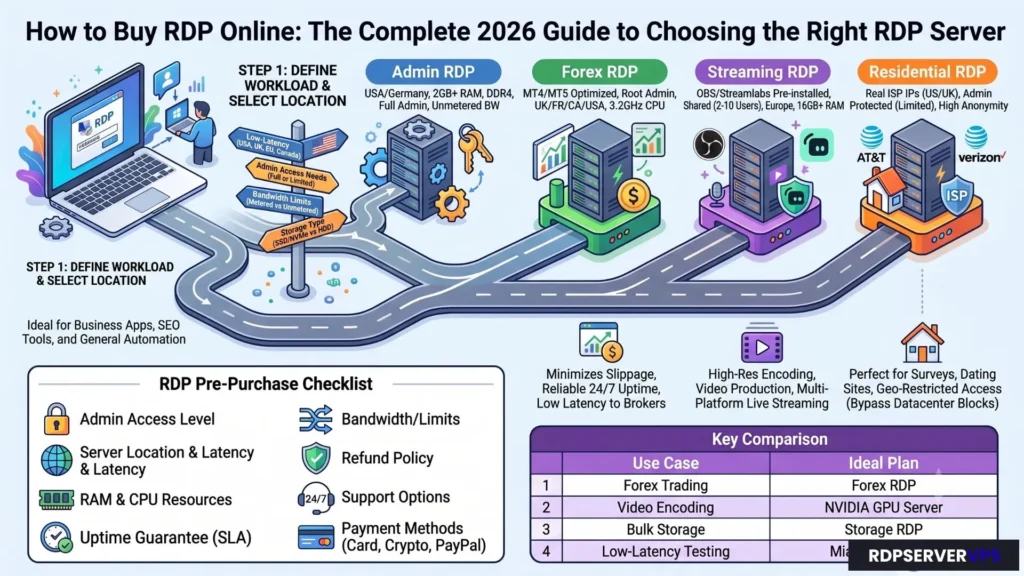
- Define your workload first. Decide whether you need RDP for browsing, trading, streaming, or heavy automation — this single decision drives every other choice on this list.
- Pick a plan category. Use the pricing table above to match your task to a real plan — Forex RDP for trading, Admin RDP for general business/automation, Streaming RDP for OBS, or a USA Dedicated Server for heavy workloads.
- Select a server location. Choose based on where your target tools, exchanges, or audiences are located — not just where it’s cheapest.
- Compare payment options. Confirm the provider accepts a payment method that’s actually available to you.
- Check delivery speed. Instant/automated delivery means you can start working within minutes; dedicated GPU and storage servers can take 12–24 hours for physical provisioning.
- Receive your credentials. You’ll get an IP address, username, and password by email or a client dashboard.
- Connect using an RDP client. Open “Remote Desktop Connection” (mstsc.exe) on Windows, or an RDP app on Mac/Linux/mobile, and log in.
- Secure the server immediately. Change the default port, enable Network Level Authentication, and set a strong password before doing anything else.
Server Location & Latency — Why It Matters
Where your RDP server physically sits affects speed, especially for trading platforms and time-sensitive automation. Real data center coverage spans the USA (New York, Dallas, Los Angeles, and Miami), the UK (London), Europe (Germany, France, Finland), and Canada.
| Server Region | Best For | Recommended Plan |
| USA (New York/Dallas/LA) | US stock/forex trading, US-based tools | USA Dedicated Server, USA Admin RDP |
| Miami, USA | Low-latency USA East Coast, budget testing | Miami Cloud VPS |
| UK (London) | UK/EU trading, geo-restricted access | UK Cloud VPS, UK Residential VPS |
| Europe (Germany/France/Finland) | GDPR-sensitive workloads, streaming | Streaming RDP, NVIDIA GPU Server |
| Multi-location (UK/France/Canada/USA) | Forex trading close to major brokers | Forex RDP |
If your trading platform or target audience is US-based, a US-located RDP will almost always outperform a distant one for execution speed, even if the distant one is cheaper.
What to Check Before You Buy RDP
Before you hand over payment details, run through this checklist — it’s the difference between a smooth setup and a support ticket nightmare.
| Checklist Item | Why It Matters |
| Full admin access | Needed to install software, change firewall rules, run scripts |
| Server location (USA, UK, EU, Canada) | Affects latency and IP-based tool eligibility |
| RAM & CPU cores | Match to your actual workload, not the cheapest tier |
| SSD/NVMe vs HDD storage | SSD/NVMe dramatically improves load times for trading/dev tools |
| Bandwidth limits | Unmetered or high-cap bandwidth avoids surprise throttling |
| Uptime guarantee (SLA) | 99.9% is the realistic industry standard |
| Payment flexibility | Card, PayPal, or crypto depending on your region |
| Instant vs manual delivery | Instant activation saves hours when you need to start now |
| Refund policy | Protects you if the server doesn’t meet expectations |
| Support availability | 24/7 live support matters when a server issue happens at 2 AM |
Choosing the Right RDP Plan by Use Case
| Use Case | Recommended Plan | Why |
| Web browsing / light testing | Miami Cloud VPS | Lightweight, starts at $4.99/mo |
| Forex/stock trading | Forex RDP | MT4/MT5-optimized, low latency to brokers |
| Business apps & automation | Admin RDP | Full admin access, DDR4 RAM, unmetered bandwidth |
| Live streaming / OBS | Streaming RDP | Pre-installed OBS/Streamlabs, up to 64GB RAM |
| Video rendering / AI training | NVIDIA GPU Dedicated Server | Dedicated GTX 1650/1080 GPU, CUDA cores |
| Databases, heavy workloads | USA Dedicated Server | Up to 128GB RAM, full root admin |
| Surveys/dating sites / geo-restricted access | USA Residential VPS or UK Residential VPS | Real ISP residential IPs (AT&T, Verizon, Spectrum) |
| Backup & bulk storage | AMD EPYC Storage RDP | Large HDD allocation for archiving |
| High-bandwidth transfers | 10 Gbps Dedicated Server | Built for large, sustained data transfer |
Common RDP Buying Mistakes to Avoid
| Mistake | Consequence | Fix |
| Buying the cheapest plan regardless of specs | Server lags or crashes under real workload | Match specs to the use-case table above |
| Ignoring server location | High latency for trading/automation | Pick a region from the location table above |
| Skipping the admin access check | Can’t install required software | Confirm full admin/root access — note that Streaming and Residential RDP plans intentionally restrict this |
| Not asking about refund policy | Stuck with an unusable server | Choose providers with a clear refund window |
| Leaving default port and password | Higher risk of brute-force attacks | Change port and password on day one |
| Overlooking bandwidth caps | Unexpected throttling mid-task | Confirm bandwidth limits in writing before purchase |
Payment Methods to Look For
A trustworthy RDP provider should support more than one payment path, especially since not every buyer has access to the same banking options. Standard coverage includes:
| Payment Method | Best For |
| Credit/Debit Card | Fastest, most common |
| Cryptocurrency (BTC, USDT) | Privacy-focused or international buyers |
| PayPal | Buyer-protected transactions |
Security Basics Every RDP Buyer Should Know
RDP is powerful, but it’s also a known target for attackers if left unprotected. RDP is a top target for password-guessing and ransomware attacks, so exposing it directly to the internet without safeguards carries real risk. A few non-negotiables before you start using your new server:
- Change the default port. RDP listens on port 3389 by default — the default port that RDP runs on is 3389, meaning any connection attempt initiates over that port unless it’s manually changed. Attackers scan this port constantly, so switching it reduces automated attack attempts.
- Enable Network Level Authentication (NLA). Adds a login layer before a full session even starts.
- Use strong, unique passwords. Never reuse your email or social media password.
- Whitelist your own IP where possible, instead of leaving the server open to all connections.
- Keep Windows updated. Most RDP exploits target outdated systems, not the protocol itself.
- Enable two-factor authentication if your provider supports it, for an extra layer beyond just a password.
| Security Feature | Purpose |
| Custom RDP port | Reduces automated bot scanning |
| Network Level Authentication (NLA) | Blocks unauthenticated connection attempts |
| Firewall rules / IP whitelisting | Restricts access to trusted IPs only |
| Regular OS updates | Patches known vulnerabilities |
| Strong password policy | Prevents brute-force access |
| Two-factor authentication | Adds a second verification layer |
Final Thoughts
Buying RDP isn’t complicated once you know what to look for: full admin access, the right resources for your actual workload, a server location that matches your target market, a provider with flexible payment options, and basic security steps applied on day one. Skip the guesswork — match your use case to the tables above, browse the full RDP hosting lineup, and you’ll land on a plan that performs instead of one you have to fight with.
Frequently Asked Questions
What is RDP used for?
RDP lets you remotely access and fully control a Windows computer or server from another device, running software, files, and applications exactly as if you were physically there.
What port does RDP use?
RDP uses TCP port 3389 by default, and many modern setups also use UDP 3389 for smoother performance with mouse movement, typing, and video. This is the standard port most providers open unless you request a custom on
How do I connect to RDP after buying it?
You’ll receive an IP address, username, and password from your provider. Open the u0022Remote Desktop Connectionu0022 app on Windows (or an RDP client on Mac/Linux), enter the IP, and log in with the credentials provided.
Is buying RDP legal?
Yes — RDP itself is a standard Microsoft remote-access technology used by millions of businesses and IT teams worldwide. It’s simply rented computing access, similar to renting a VPS or cloud server.
Is RDP the same as VPS?
No. RDP is a way to remotely access an existing desktop environment, while a VPS is a full virtualized server with root access designed for hosting websites, apps, and databases. Many providers let you run RDP on top of a VPS for the best of both.
What’s the difference between Cloud and Residential RDP/VPS?
Cloud plans like Miami Cloud VPS and UK Cloud VPS use datacenter IPs, ideal for hosting and general workloads. Residential plans use IPs assigned by real ISPs (ATu0026amp;T, Verizon, Spectrum), making them better suited for surveys, dating platforms, and tasks requiring high anonymity.
Can I upgrade my RDP plan later?
Most providers, including plans across Admin RDP, Forex RDP, and USA Dedicated Server tiers, allow RAM, CPU, and storage upgrades without needing to migrate to a new server.
How many users can use one RDP account?
Standard RDP plans are built for one active session at a time. Streaming RDP plans are the exception — they’re shared environments supporting 2–10 users per node.
References
- Microsoft Learn. “Enable Remote Desktop on Your PC.” learn.microsoft.com. 2026.
- Microsoft Learn. “Troubleshoot RDP Authentication Errors on Azure VM.” learn.microsoft.com. March 2024.
- Microsoft Learn. “Configure Network Level Authentication for a Terminal Server.” learn.microsoft.com. Archived.
- CISA. “2021 Trends Show Increased Globalized Threat of Ransomware (AA22-040A).” cisa.gov. February 2022.
- CISA. “CISA and Partners Release Advisory Update on Akira Ransomware.” cisa.gov. November 2025.
- CISA. “#StopRansomware: Rhysida Ransomware (AA23-319A).” cisa.gov. 2023.
- AWS. “What Is VPS? Virtual Private Server Explained.” aws.amazon.com. 2026.
- Wikipedia. “Virtual Private Server.” en.wikipedia.org. Accessed August 2026.
- TechTarget. “Virtual Private Server (VPS) or Virtual Dedicated Server (VDS) — Definition.” techtarget.com. Accessed August 2026.
- Cloudflare. “What Is a VPN?” cloudflare.com. Accessed August 2026.
- Cloudflare Developers. “VPN Overview — Learning Paths.” developers.cloudflare.com. April 2026.
- QuantVPS. “Top 13 Forex VPS Solutions: Low-Latency for MT4, MT5 (2026).” quantvps.com. March 2026.
- QuantVPS. “MetaTrader VPS Hosting — 0-10ms Latency Forex VPS.” quantvps.com. Accessed August 2026.
- PetroSky. “Forex VPS Hosting — Low-Latency MT4/MT5 VPS.” petrosky.io. Accessed August 2026.
- VPSForexTrader. “Forex VPS Hosting – Ultra Low Latency.” vpsforextrader.com. February 2022.
- GDPRLocal. “GDPR Data Residency Requirements: Where Must Data Be Stored?” gdprlocal.com. June 2025.
- MassiveGRID. “GDPR and Data Residency: Why European Hosting Locations Matter.” massivegrid.com. March 2026.
- PingPing. “Uptime SLA Explained: 99.9% vs 99.99% vs 99.999%.” pingping.io. March 2026.
- Notifier. “SLA Uptime Calculator: What Is a Good Uptime Percentage?” notifier.so. March 2026.
- HP. “SSD vs HDD: Choosing the Best Storage for Your Needs.” hp.com. 2026.
- IEEE Xplore. “Comparison of HDD and SSD Read/Write Performance.” ieeexplore.ieee.org. Accessed August 2026.
- ProtocolPorts. “Port 3389 (RDP) – What It Is & How to Open It.” protocolports.org. June 2026.
- CBT Nuggets. “What Is Port 3389?” cbtnuggets.com. Accessed August 2026.
- StrongDM. “What Is Network Level Authentication (NLA)? (How It Works).” strongdm.com. June 2025.