
By the RDPServerVPS Editorial Team · Updated October 2026
If you’re setting up GPU infrastructure for AI, rendering, or virtualization, there’s a good chance you’ve run into the NVIDIA License Server requirement — a confusing line in NVIDIA’s documentation about a license server. Some deployments need one. Others don’t. The difference comes down to which NVIDIA software stack you’re running — not which GPU you bought.
This guide covers when the NVIDIA License Server (the Delegated License Service, or DLS) applies, when it doesn’t, and what that means on a GPU Dedicated Server running Tesla T4, A2, A10, or L4 GPUs instead of a virtualized cluster.
What Is the NVIDIA License Server Requirement?
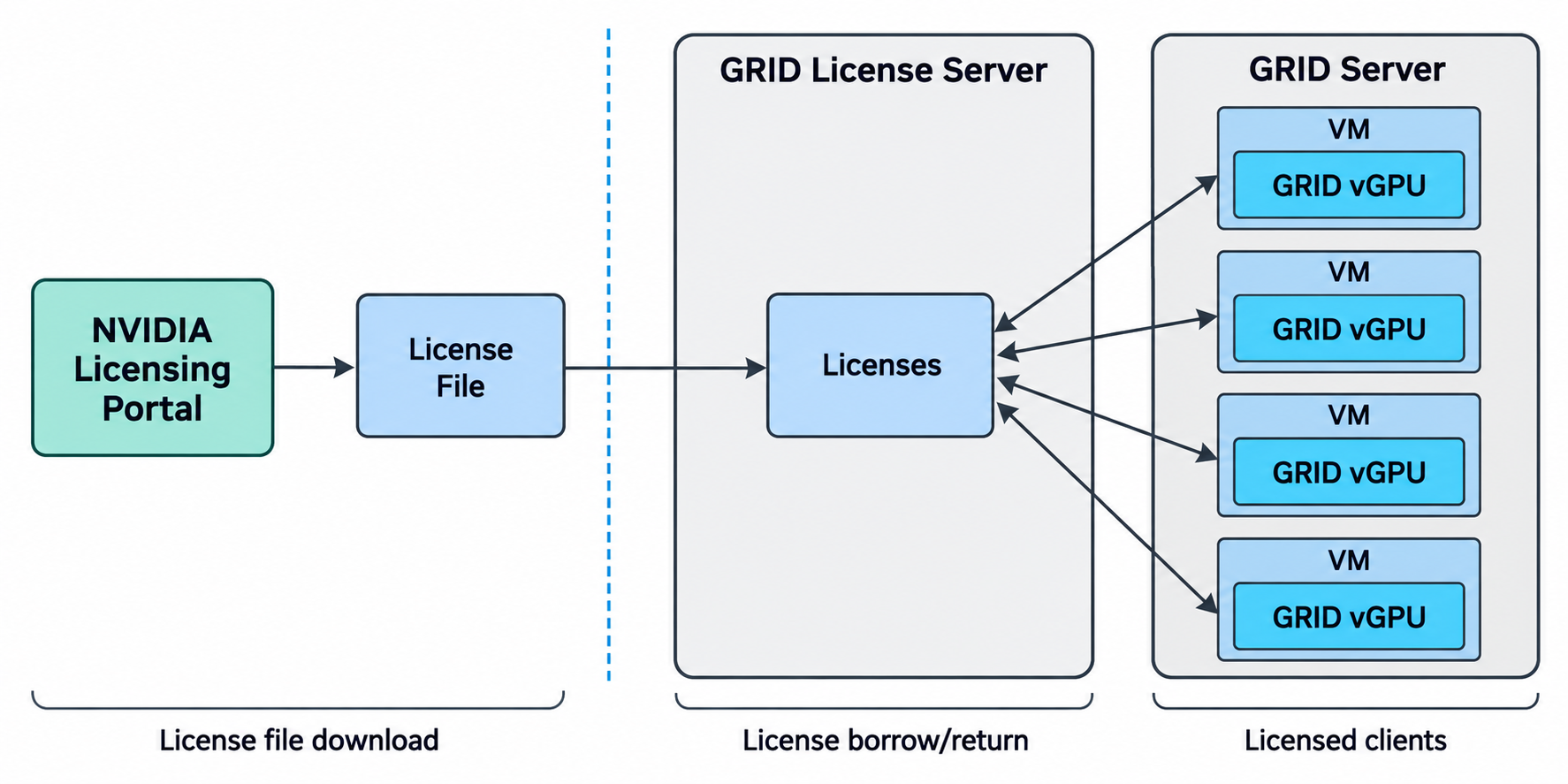
The NVIDIA DLS license server — still widely called the “NVIDIA GRID license server” from its earlier branding — is an on-premises licensing service that NVIDIA’s vGPU software checks in with. It’s part of the NVIDIA License System (NLS), and its job is to issue and track NVIDIA vGPU license entitlements for virtual GPU (vGPU) instances running on a hypervisor.
When a VM boots with vGPU software installed, it checks out a license from the DLS, or from NVIDIA’s hosted alternative, the NVIDIA cloud license server (the Cloud License Service, CLS). Without a valid license, the vGPU still runs — but at reduced capability: capped frame rates, disabled CUDA, and restricted resource allocation, per NVIDIA’s own licensing documentation (NVIDIA License System Documentation).
So the DLS isn’t tied to a specific GPU model. It’s tied to NVIDIA vGPU software — the hypervisor-level driver and management layer that slices a physical GPU into multiple virtual GPUs for VMs.
When You Actually Need a Dedicated License Server
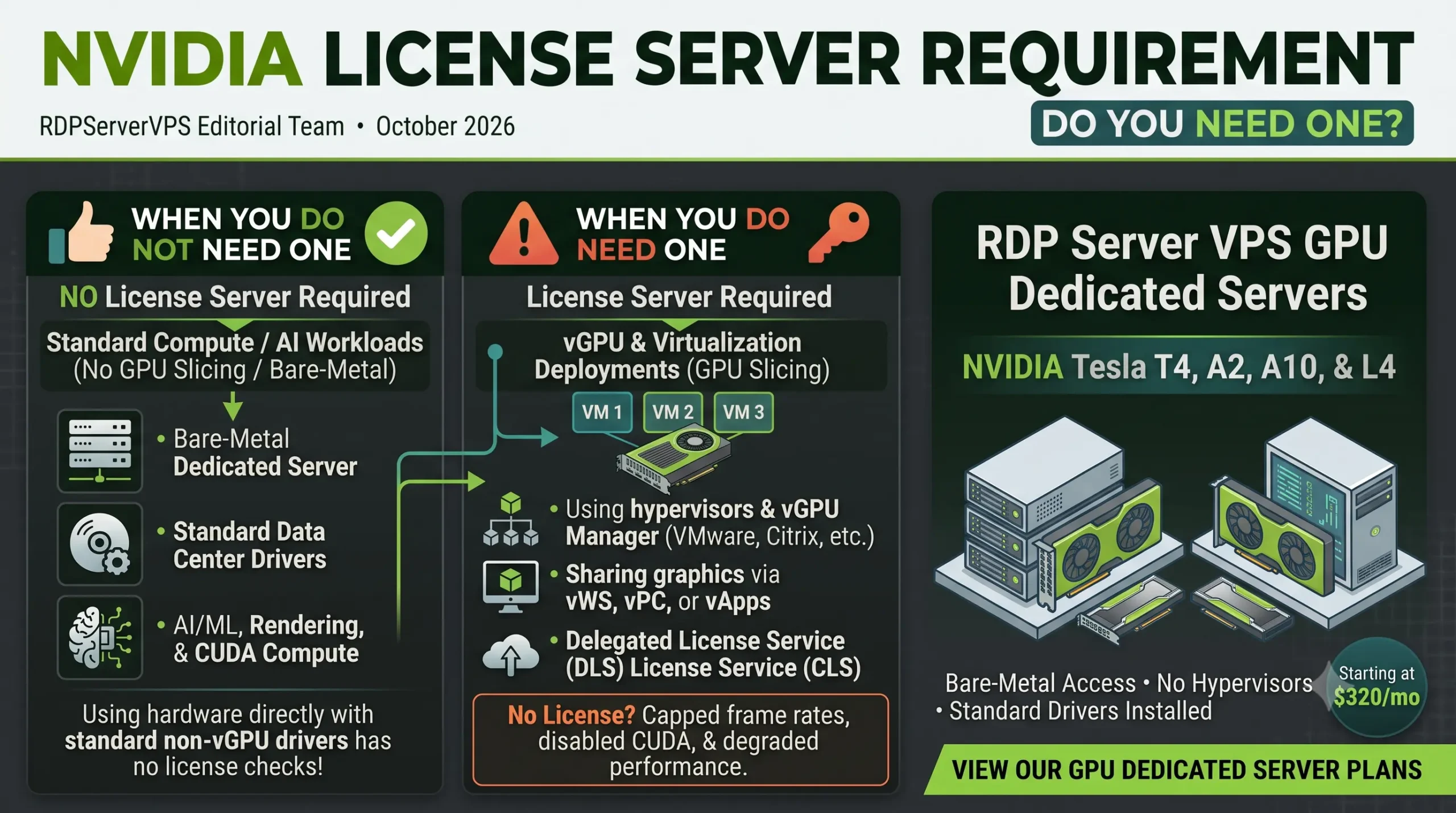
You need a DLS (or NVIDIA’s Cloud License Service) if your deployment uses NVIDIA’s vGPU software in any of these ways:
- You’re running a hypervisor (VMware vSphere, Citrix Hypervisor, etc.) with the vGPU Manager installed, splitting one physical GPU across multiple VMs.
- You’re licensing for vWS (Virtual Workstation) to deliver full graphics/CAD/3D acceleration to virtual desktops.
- You’re running GPU passthrough or even a bare-metal deployment but using NVIDIA’s vGPU graphics software stack rather than a standard data center driver.
In short: if the vGPU Manager or vGPU graphics driver is part of your stack, the DLS requirement follows the software, not the hardware.
When You Don’t — Standard GPU Drivers, No vGPU Software
Here’s the distinction that gets lost in most explanations: NVIDIA vGPU software and NVIDIA’s standard data center drivers are two different products.
If you’re running AI training, inference, rendering, or general CUDA compute workloads on a bare-metal dedicated server — no hypervisor, no GPU slicing, no vGPU Manager installed — you’re using the standard NVIDIA data center driver, not the licensed vGPU graphics stack (which NVIDIA distributes only through its Software Licensing Portal). That standard driver path does not check out a vGPU license, because no vGPU software is running to check one out.
This is the model our GPU Dedicated Server plans are built on: single-tenant access to a physical Tesla T4, A2, A10, or L4 GPU, with no hypervisor and no vGPU slicing layer in between. For that deployment — standard compute/AI use on a dedicated, non-virtualized GPU — there’s no DLS and no vGPU license to worry about; you won’t need to install NVIDIA license server software at all.
This is scoped to our specific offer and your use case, not a universal rule for every NVIDIA GPU. If you install NVIDIA’s vGPU graphics software yourself for virtual workstation graphics (vWS), that specific software stack still requires a license.
vGPU Licensing vs. GPU Passthrough — What We Actually Sell
| Our GPU Dedicated Servers (Full Passthrough, Standard Driver) | vGPU Software Deployment (vWS / vPC / vApps / vCS) | |
|---|---|---|
| NVIDIA license server required? | No — standard compute driver, no vGPU software installed | Yes, for full capability (vWS), or EULA-only at reduced capability (vApps) |
| Hypervisor / GPU slicing | None — one physical GPU, one tenant | Yes — GPU sliced across multiple VMs |
| Access model | Full admin/root on bare metal (6 of 7 of our plans) | Shared, hypervisor-mediated |
| Typical use case | AI/ML training & inference, rendering, CUDA compute | Virtual desktops, shared graphics workstations |
Where the DLS Fits If You’re Running Your Own vGPU Environment
If your workload specifically requires NVIDIA’s vGPU software — for example, you’re building a VDI environment and need an NVIDIA vGPU license (vWS) for multiple virtual desktops off one physical GPU — you would deploy and manage your own DLS instance (or use NVIDIA’s Cloud License Service) and point your vGPU-enabled VMs at it. That’s a licensing and software configuration you control on top of the hardware; it isn’t something a bare-metal GPU dedicated server provider manages for you, and it isn’t the default our plans are configured for.
Our Bare-Metal GPU Servers: What’s Included, What Isn’t
RDP Server VPS’s GPU Dedicated Server plans ship in seven configurations across four GPU families — Tesla T4, A2, A10, and L4 — from a single 16GB card up to four 24GB cards on one server:
- GPU Dedicated Server #1–2: NVIDIA Tesla T4 (16GB), single or dual, dual Intel Xeon E5-2667v4, 64GB RAM, from $320.00/mo
- GPU Dedicated Server #3: NVIDIA A2 Tensor Core (16GB), from $320.00/mo
- GPU Dedicated Server #4–5: NVIDIA A10 Ampere or L4 ADA (24GB), from $410.00/mo
- GPU Dedicated Server #6–7: Quad or dual NVIDIA L4 ADA, Xeon Gold 6134, 10Gbps network, from $750.00–$1,020.00/mo
Full admin/root access is included on six of the seven configurations; the top-tier quad-L4 plan ($1,020/mo) doesn’t currently confirm administrator access on its listing, so check that directly if you need it. All plans include UK (London) data center hosting and your choice of Linux or Windows at order — no hypervisor, no vGPU slicing, no shared tenants.
What’s not included: NVIDIA’s licensed vGPU software stack (vWS/vPC/vApps/vCS) and any associated DLS or Cloud License Service setup. If your project needs that software layer, you’d license and configure it yourself on top of the dedicated hardware — we’re not positioned as a managed vGPU/VDI provider.
Choosing the Right GPU Server for Your Workload
- AI/ML training or inference, rendering, general CUDA compute: A standard bare-metal GPU dedicated server (our default model) covers this with no license server to manage.
- Virtual desktops or shared graphics workstations for multiple users off one GPU: That calls for NVIDIA’s vGPU software and a vWS license — a different deployment model than what our plans provide out of the box.
- Entry-level inference or lighter workloads: The single Tesla T4 or A2 configurations ($320/mo) are the most cost-efficient starting point.
- Heavier training or multi-model serving: The quad L4 configuration ($1,020/mo) gives the most total VRAM (96GB) across four GPUs — note its admin-access status isn’t confirmed on the listing, so check before ordering if that matters for your workload.
- Gaming, 3D rendering, or video-encoding workloads rather than datacenter AI/compute: that’s a different use case from the datacenter-class GPUs covered in this guide — see our other NVIDIA GPU server page if that fits your needs better, and confirm current specs and pricing directly on that page before ordering.
Common Mistakes to Avoid
- Assuming “no license needed” applies to every NVIDIA deployment. It’s specific to standard-driver, non-vGPU use — not a blanket rule.
- Confusing GRID/DLS naming with GPU model. The license server is tied to the vGPU software, not to whether you own a T4, A2, A10, or L4.
- Installing vGPU software “just in case.” If you don’t need GPU slicing or multi-user virtual desktops, you don’t need the licensed vGPU stack or the DLS that comes with it.
Conclusion
The NVIDIA License Server requirement comes down to one question: are you running NVIDIA’s vGPU software, or a standard data center driver? Our GPU Dedicated Server plans use the latter — no DLS, no vGPU license to manage. If your project needs vGPU-based virtual desktops or shared graphics workstations, that’s a separate licensed layer you’d configure independently of the hardware.
Frequently Asked Questions
Does the NVIDIA license server require a dedicated server?
No. The NVIDIA License Server requirement is tied to NVIDIA’s vGPU software stack, not to dedicated vs. shared hosting. A dedicated server running standard compute drivers (no vGPU software) needs no license server at all. A dedicated server running NVIDIA’s vGPU graphics software for virtual desktops would still need one, same as a virtualized setup would.
What is the NVIDIA DLS used for?
The DLS (Delegated License Service) issues and tracks licenses for NVIDIA vGPU software deployments — primarily vWS (Virtual Workstation) licenses for virtual desktops and shared graphics workloads, and vApps/vPC/vCS licenses for other vGPU-based use cases.
Do I need an NVIDIA license to run AI or rendering workloads on a GPU server?
Not if you’re using a standard bare-metal GPU dedicated server with NVIDIA’s regular compute driver, which is how our GPU Dedicated Server plans are configured. You only need a vGPU license (vWS/vPC/vApps/vCS) if you specifically install NVIDIA’s vGPU software stack.
Can I run NVIDIA’s vGPU software on your GPU dedicated servers?
Our plans are provisioned as full-admin, single-tenant bare-metal servers without a hypervisor or vGPU Manager pre-installed. If your workload requires NVIDIA’s vGPU software stack and its licensing, that configuration and the associated DLS/Cloud License Service setup would need to be handled on your end — it isn’t part of the default plan setup.
How do I install an NVIDIA license server (DLS)?
This only applies if you’re running NVIDIA’s vGPU software and need on-premises licensing. You’d get the DLS virtual appliance through the NVIDIA Licensing Portal under an NVIDIA Enterprise Account entitlement, then deploy and configure it per NVIDIA’s own DLS user guide. If you’re running standard AI/compute workloads on a bare-metal GPU dedicated server like ours, there’s nothing to install — no DLS, no license client, because no vGPU software is in the stack to begin with.
What happens if a vGPU doesn’t have a valid license?
Per NVIDIA’s own licensing documentation, an unlicensed vGPU still boots but runs at reduced capability: performance degrades if the VM doesn’t obtain a license within 20 minutes, and degrades further after 24 hours, with CUDA disabled on compute-capable vGPUs. This only affects vGPU software deployments — a standard bare-metal GPU dedicated server never goes through this license-checkout flow at all, since it isn’t running vGPU software.
References
- NVIDIA – License System Documentation
- NVIDIA – vGPU Software Licensing Guide: Introduction
- NVIDIA – Delegated License Service (DLS) 3.6.1 User Guide
- NVIDIA – vGPU Software Quick Start Guide: Getting NVIDIA vGPU Software
- NVIDIA – vGPU Software Driver (RTX vWS, vPC, vApps)
- NVIDIA – Virtual GPU Software Licensing FAQ
- NVIDIA – License System FAQ (NLS)
- NVIDIA – Virtual GPU Software Packaging, Pricing, and Licensing Guide
- NVIDIA – AI Enterprise and NVIDIA vGPU for Compute
- NVIDIA – Data Center / Tesla Driver Documentation
- NVIDIA – Tesla T4 Tensor Core Datasheet (PDF)
- NVIDIA – A2 Tensor Core GPU (official product page)
- NVIDIA – A10 Tensor Core GPU (official product page)
- NVIDIA – L4 Tensor Core GPU (official product page)
- RDP Server VPS – GPU Dedicated Servers (live product page)