
What Is USA Residential RDP? Complete Guide for 2026 Users
USA Residential RDP: Complete Guide to Secure and Reliable Remote Access in 2026
The internet has changed a lot in the past few years. Websites, ad networks, and online platforms have gotten better at spotting who’s visiting and responding to them. Factors like IP reputation, location, browsing habits, and connection type now shape how online services treat each visitor.
As a result, businesses, remote workers, developers, marketers, and researchers are looking for remote access tools that offer both speed and authenticity. One option that has gained real attention is USA Residential RDP.
Traditional remote desktop services route traffic through data center networks. A USA Residential RDP is different: it uses a genuine residential IP address assigned by a real U.S. internet service provider. That combination of remote desktop access and residential connectivity is what sets it apart from a standard RDP.
This guide covers what USA Residential RDP is, how it works, its benefits and use cases, and what to check before choosing a provider.
What Is USA Residential RDP?
USA Residential RDP is a remote desktop environment connected to a home-based internet line in the United States.
RDP, short for Remote Desktop Protocol, lets users access and control a remote computer from almost anywhere. Through a secure connection, users can run apps, open files, and work on that machine as if sitting right in front of it.
The key difference is the type of IP address used.
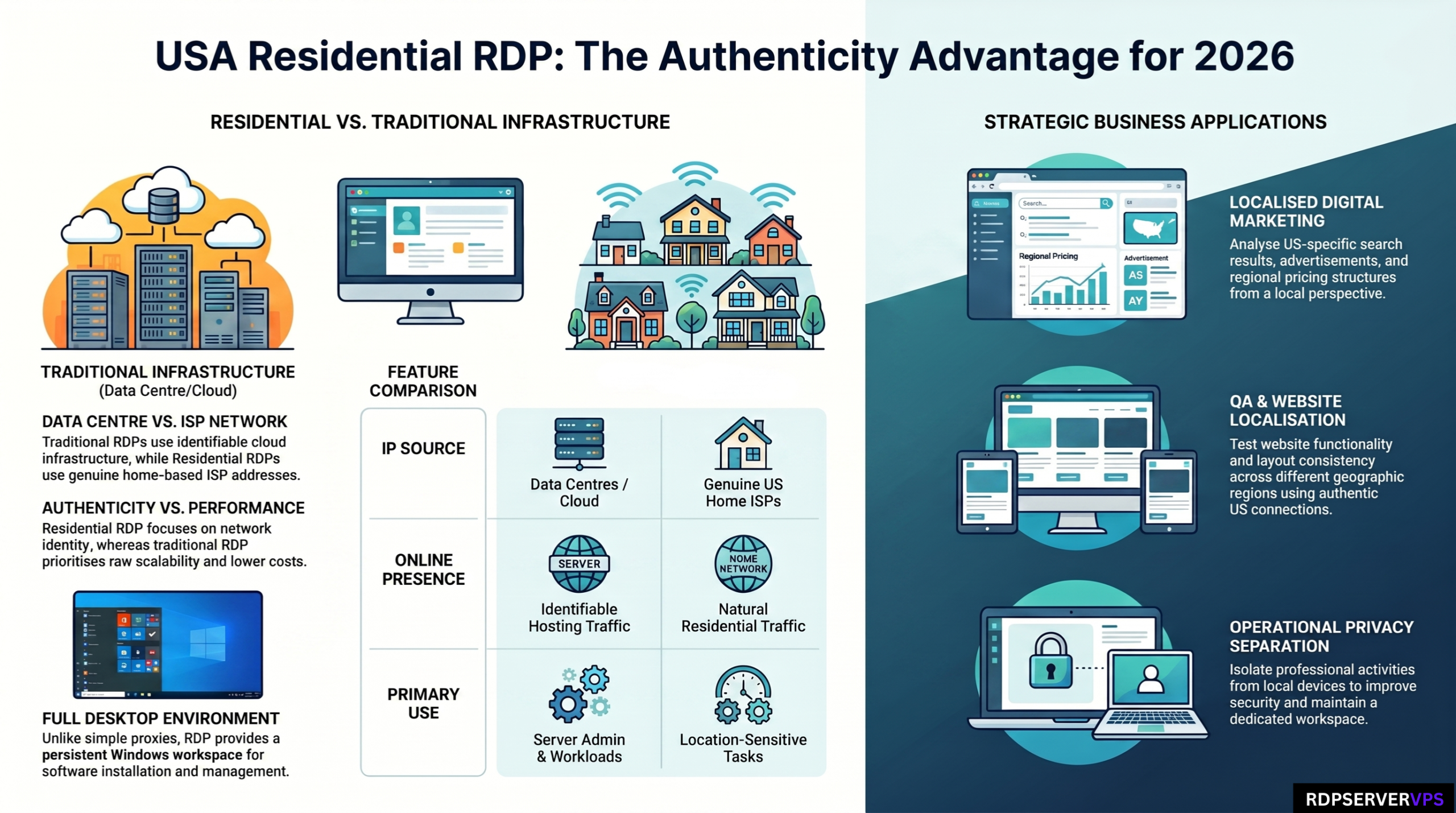
Traditional RDP services typically run on cloud providers, VPS setups, or commercial data centers. These systems use data center IP addresses that are easy to flag as hosting infrastructure.
This option, by contrast, uses a home-ISP IP address assigned by a real US internet provider. Because these IPs come from real home internet connections, they tend to look more natural to websites and online services.
This distinction makes it a popular option for users who need both remote access and a believable home-network presence.
How Does USA Residential RDP Work?
It works almost the same way as a standard RDP.
A provider sets up a remote Windows machine that users reach using Remote Desktop software. Once connected, users get a full desktop where they can install apps, browse the web, manage files, and handle everyday tasks.
The difference occurs at the network level.
Instead of routing traffic through a commercial hosting network, the remote desktop connects through a home-ISP line in the United States.
When a website gets a request from the remote desktop, it sees that IP address tied to the US ISP, not the user’s own home connection.
This lets users work remotely while keeping a genuine home-network identity.
Why IP Addresses Matter in Today’s Internet
Modern websites rely heavily on IP intelligence.
Every time someone visits a website, it analyzes signals like location, device type, browser settings, and network type. These signals help websites personalize content, improve security, and catch unusual activity.
These types of IP addresses matter here because real households, not companies, hold them through their internet providers.
By contrast, data center IPs come from hosting facilities and cloud providers, often serving thousands of users and bots at once.
As online security systems advance, home-network and data-center traffic are treated more and more differently.
That’s one reason this kind of connectivity keeps growing in popularity among businesses and professionals who need a more authentic online presence.
USA Residential RDP vs Traditional USA RDP
Although both services provide remote desktop access, they serve different needs.
Traditional USA RDP is built mainly for speed, scale, and low cost. It’s commonly used for software development, server admin, remote work, hosting apps, and general business tasks.
This option, on the other hand, pairs remote desktop access with a home-network identity.
USA Residential RDP
- Uses a home-ISP IP address
- Provides a more natural online presence
- Suitable for location-sensitive tasks
- Often costs more due to limited resources
- Offers enhanced geographic authenticity
Traditional USA RDP
- Uses data center IP addresses
- Generally more affordable
- Easier to scale and upgrade
- Widely available across multiple locations
- Ideal for general computing and business workloads
Choosing between the two mostly depends on whether that kind of IP authenticity matters for your use case.
Major Benefits of USA Residential RDP
A Genuine Home-Network Identity
One of its biggest advantages is operating through a genuine home-ISP IP address.
Because these IPs belong to real ISP networks, they represent ordinary household connections. That makes browsing look like typical user activity.
Access to US-Based Online Experiences
Many websites customize content based on geographic location.
Search results, ads, promotions, language, pricing, and layout can all vary by region.
A USA Residential RDP lets users see websites from a US perspective, useful for testing, analysis, and localization work.
Improved Privacy Separation
Using this setup keeps your local device separate from your online activity.
Instead of working directly from your home computer, everything happens inside the remote desktop.
This can improve day-to-day privacy while keeping your workflow professional.
Dedicated Remote Workspace
It works as a separate computer that’s always available when needed.
Users can install software, store files, manage projects, and keep separate work setups without touching their personal devices.
This separation can improve organization and productivity.
Consistent Accessibility
Since the remote desktop stays online on its own, work can continue from almost any location with an internet connection.
This is especially useful for remote teams, freelancers, consultants, and businesses with workers spread across locations.
Common Use Cases
This kind of RDP is used across a wide range of industries.
Digital Marketing
Marketers often need to check ads, landing pages, and search results from different locations.
This option gives a reliable way to see how campaigns look to US-based audiences.
Website Testing and Quality Assurance
Developers and QA teams often test sites from different locations to check that features, localization, and user experience all hold up.
This setup can help with that kind of testing.
Market Research
Businesses doing research often need to see how products, services, promotions, and online experiences look to customers in specific regions.
A home-ISP connection helps give a more localized view.
Remote Work
Many professionals need secure access to their own computing setup, available no matter where they are.
It can serve as a reliable remote workstation.
Ad Verification
Ad agencies and brands often need to check how ads display across different regions and networks.
A home-based US connection can help with that check.
SEO and Search Engine Analysis
SEO professionals often track localized search results, rankings, and visibility across regions.
This setup can offer real insight into regional search results.
USA Residential RDP vs Residential Proxies
Many people confuse Residential RDPs with Residential Proxies, but they are fundamentally different technologies.
A Residential Proxy just routes traffic through a home-ISP IP address.
A Residential RDP provides a full desktop environment along with a home-network connection.
Residential RDP Advantages
- Full Windows desktop environment
- Software installation capability
- Dedicated workspace
- Persistent sessions
- Independent operating system
Residential Proxy Advantages
- Simpler setup
- Lower cost in many cases
- Easy browser integration
- Flexible network routing
If you mainly need a full remote workstation, this option is generally the better fit.
If you only need traffic routed through a home-ISP IP, a residential proxy may be sufficient.
Important Factors to Consider Before Choosing a Provider
Not all of these services are equal. Before picking a provider, weigh the factors below.
IP Quality
Make sure the IP comes from a real residential internet provider in the United States.
Hardware Performance
CPU, RAM, and SSD storage directly affect how responsive and fast the system feels.
Network Reliability
Stable connections and high uptime matter most for workflows that can not drop.
Operating System Availability
Different projects may need different operating systems, so check that the provider supports the one you want.
Technical Support
Good customer support cuts down on downtime and troubleshooting headaches.
Scalability
Your needs may change over time, so a provider with flexible upgrade options can pay off.
Security Best Practices for Remote Access
Security should always remain a top priority.
While this type of service offers strong features, users still need to follow good security habits.
Some recommended measures include:
- Use strong and unique passwords
- Enable two-factor authentication whenever possible
- Keep operating systems updated
- Install trusted security software
- Restrict access to authorized users
- Monitor login activity regularly
- Use encrypted connections
These practices help protect sensitive data and maintain a secure working environment.
Challenges and Limitations to Know
This setup has real advantages, but it is worth knowing its limits too.
Higher Costs
Residential IP resources are more limited than data center ones, which often means higher prices than traditional RDP.
Limited Availability
Residential IP inventories are typically smaller than commercial hosting networks.
As a result, location options and upgrade flexibility may be more limited.
Resource Constraints
Some of these setups may not scale as well as large cloud providers do.
Not Necessary for Every User
Many users can accomplish their goals using standard VPS hosting or traditional RDP services.
It is most useful when that IP authenticity gives a real advantage.
Understanding these limitations helps users make informed purchasing decisions.
The Future of This Technology
The demand for trustworthy online identities continues to grow.
As websites invest more in security, personalization, and fraud prevention, this kind of connectivity is likely to matter even more.
Businesses are putting more weight on accurate market research, localized testing, remote collaboration, and secure operations.
At the same time, remote work keeps growing worldwide, raising the need for flexible setups that combine speed, access, and security.
USA Residential RDP is expected to evolve alongside these trends, with better infrastructure, stronger security, and a smoother user experience.
Conclusion
USA Residential RDP blends remote desktop technology with genuine residential internet connectivity. That combination is valuable for digital marketers, developers, researchers, and remote teams working on location-sensitive tasks.
Traditional RDP still works great for many workloads, but Residential RDP adds real benefits for users who need stronger geographic authenticity and a more genuine network presence.
Before picking a provider, weigh IP quality, hardware resources, security features, network reliability, and support options carefully. With the right choice, a USA Residential RDP can deliver a secure, flexible, and efficient remote computing experience built for today’s digital demands.
Frequently Asked Questions About USA Residential RDP
What is a USA Residential RDP?
A USA Residential RDP is a remote desktop environment connected to a genuine home internet connection in the United States. Unlike traditional RDP services that use data center IP addresses, this type operates through an ISP-assigned home-network IP, providing a more authentic US-based online presence.
What is the difference between a USA Residential RDP and a traditional RDP?
The main difference is the type of IP address used. A traditional RDP typically uses a data center IP, while this option uses a real residential IP address assigned by a US internet service provider. That makes it more suitable for location-sensitive tasks, testing, and regional analysis.
Who should use a USA Residential RDP?
This type of RDP is commonly used by digital marketers, SEO professionals, software testers, researchers, remote workers, and businesses that need a dedicated remote desktop with a US residential internet connection. It can be useful for website testing, localized research, and remote work.
Is a USA Residential RDP more secure than a standard RDP?
Security depends on the provider and the user’s practices rather than the IP type itself. To improve security, users should choose a trusted provider, use strong passwords, enable two-factor authentication when available, keep software updated, and regularly monitor account activity.