cheap windows vps – Best Uses for Digital Marketers & Automation
In today’s fast-moving digital world, marketers need speed, control, security, and automation to stay ahead. This is where Windows VPS becomes a powerful solution. Whether you are running marketing automation tools, managing multiple ad accounts, or hosting applications, a Windows VPS helps you work smarter, faster, and more securely—even when you are looking for a reliable and cheap Windows VPS option.
This blog is carefully written for beginners and growing websites in clear, professional, and easy-to-read English. It provides a complete understanding of what Windows-based VPS is, why it is a reliable solution, and how digital marketers can use it strategically to improve performance, increase clicks, and drive higher conversions.
What Is Windows VPS?
A Virtual Private Server running on the Windows operating system works like a dedicated computer. It is hosted on a powerful physical machine and provides users with an isolated environment, offering better performance, control, and reliability compared to shared hosting.
Unlike shared hosting, where resources are divided among many users, Windows VPS hosting gives you dedicated RAM, CPU, and storage. This means better speed, more control, and higher reliability. Digital marketers prefer Windows-based VPS because it supports many popular tools, automation software, and Windows-based applications.
In simple words, Windows-based VPS gives you freedom, performance, and stability—all in one place.
Why Digital Marketers Prefer Windows VPS
Digital marketing requires multitasking, automation, and constant performance. A Windows-based VPS is designed exactly for these needs.
First, it provides full administrative control. You can install any marketing tool, automation software, or tracking application without restrictions. Second, it offers stable performance, which is very important when running bots, ad tools, or email automation 24/7.
Another big reason is Windows compatibility. Many marketers already use Windows-based software, and a Windows-based VPS feels just like using a remote Windows PC. This makes it beginner-friendly and easy to manage.
Best Uses of Windows VPS for Digital Marketers
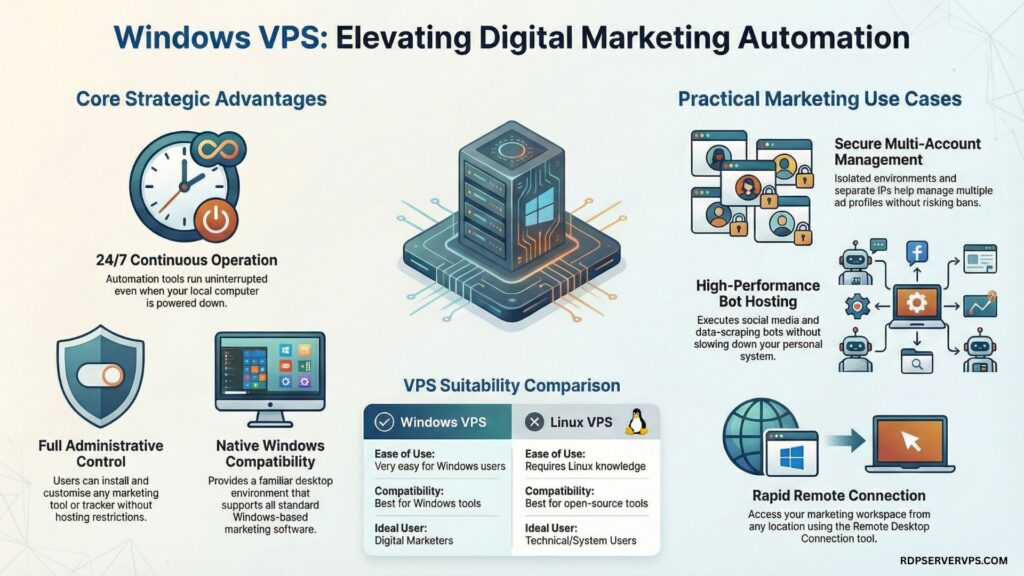
Below are the most practical and high-value uses of cheap Windows VPS for digital marketing and automation.
1. Marketing Automation Tools
It is widely used for running marketing automation tools without interruptions. These tools can work day and night without depending on your local computer.
You can automate email campaigns, CRM processes, lead generation tasks, and reporting systems. Since the VPS stays online 24/7, your automation continues even when your personal system is turned off. This saves time and increases productivity.
Steps to use Windows VPS for automation:
- Install your required automation software
- Configure schedules and triggers
- Run tasks continuously on VPS
- Monitor performance remotely
2. Running Bots & Automation Software
Digital marketers often use bots for social media posting, data scraping, testing ads, and monitoring competitors. Running such bots on a personal computer can slow it down or cause errors.
This setup allows bots to run independently and safely, offering better speed, dedicated resources, and a lower risk of crashes. It is especially useful for handling large-scale automation tasks without affecting system performance.
With a VPS, marketers can manage automation in a controlled environment and avoid system overload.
3. Hosting Marketing Applications
Many marketers host their own tools, such as tracking software, dashboards, landing pages, or internal analytics systems. A Windows-based VPS is ideal for virtual server hosting of such applications.
You can deploy applications securely, customize server settings, and scale resources when needed. This flexibility is very helpful for growing marketing teams and agencies.
Hosting on VPS also improves reliability compared to shared hosting, which directly impacts user trust and conversions.
4. Managing Multiple Accounts Safely
Managing multiple ad accounts or social media profiles can be risky when everything is done from a single IP address. A virtual private server provides a separate and secure environment, which helps reduce potential risks.
Digital marketers use this setup to manage multiple platforms smoothly without conflicts. It is commonly used in paid advertising, affiliate marketing, and account testing.
By isolating activities in a dedicated environment, marketers can maintain better account safety, stability, and platform compliance.
Windows VPS vs Linux VPS Hosting
Both Windows-based VPS and Linux VPS hosting are popular, but they serve different user needs. The table below will help you understand the difference clearly.
| Feature | Windows VPS | Linux VPS Hosting |
| Ease of Use | Very easy for Windows users | Requires Linux knowledge |
| Software Compatibility | Best for Windows-based tools | Best for open-source tools |
| Best for Marketers | High compatibility & automation | Technical users |
| Cost | Slightly higher | Usually cheaper |
If you are a digital marketer using Windows tools, a Windows-based VPS is the better choice.
How to Set Up a VPS Server on Windows (Step-by-Step)
Many beginners ask: how to set up a VPS server Windows. The process is simple if you follow the right steps.
Steps to set up Windows-based VPS:
- Choose a reliable Windows VPS hosting provider
- Select your preferred VPS OS Windows version
- Complete payment and receive login details
- Access VPS using Remote Desktop
- Configure basic settings and security
Once done, your VPS is ready to use for marketing and automation.
How to Connect and Access Windows-based VPS
This is one of the most common questions: how to connect to a Windows VPS.
How to Connect to VPS on Windows 10
To connect, open Remote Desktop Connection on your Windows 10 system. Enter the VPS IP address, username, and password provided by your host. Click Connect, and you will see your VPS desktop.
How to Access VPS on Windows
You can access your VPS from anywhere using an internet connection. This remote access makes it extremely flexible for marketers who work from different locations or manage tasks remotely.
This setup answers common queries like how to connect to vps on Windows and how to access vps on Windows.
Cheap Windows-based VPS – Is It Worth It?
Many beginners look for cheap Windows VPS options. While affordable plans are good for starting, they come with limited resources.
A cheap Windows VPS is suitable for small automation tasks, testing tools, or learning purposes. However, for heavy automation, bots, or multiple applications, upgrading to a better plan is recommended.
Always focus on performance and reliability, not just price.
Windows VPS Use Cases Summary
The table below summarizes how Windows-based VPS helps digital marketers.
| Use Case | Benefit for Marketers |
| Automation | 24/7 task execution |
| Hosting Tools | Better performance |
| Account Safety | Separate IP environment |
| Scalability | Easy resource upgrade |
Common Mistakes to Avoid While Using Windows-based VPS
Many users make mistakes that reduce VPS performance. Avoid overloading the server with unnecessary software. Always keep security updates enabled and use strong passwords.
Another common mistake is choosing the wrong plan. Analyze your needs before selecting a VPS to avoid performance issues later.
Proper management ensures smooth operation and long-term benefits.
Final Thoughts: Is Windows VPS Right for You?
If you are a digital marketer who wants automation, control, and better performance, then a Windows-based VPS is a smart investment. It supports marketing tools, automation software, and secure account management with ease.
For new websites and growing businesses, Windows-based VPS provides a strong foundation to scale operations and improve conversions.
Conclusion
In conclusion, this solution offers digital marketers greater control, stable performance, and powerful automation capabilities. From running marketing tools and bots to managing multiple accounts securely, it supports real-world marketing needs with flexibility and reliability. It is especially helpful for beginners and growing websites that want to scale operations without added technical complexity. By selecting the right hosting environment, marketers can improve workflow efficiency, increase clicks, and build a strong foundation for long-term growth and higher conversions.
If you are serious about scaling your digital marketing efforts, now is the right time to choose a reliable Windows VPS hosting solution and take full control of your automation and marketing workflows.
Frequently Asked Questions About Windows VPS for Digital Marketing & Automation
A Windows VPS is a virtual private server running on the Windows operating system that offers dedicated resources and full control. Digital marketers use it to run automation tools, host applications, manage multiple accounts, and maintain stable performance without relying on personal computers.
Yes, a cheap Windows VPS is suitable for beginners and small automation tasks such as email tools, bots, and testing software. However, for large campaigns or heavy automation, upgrading to higher resources ensures better speed, stability, and uninterrupted performance.
You can connect to a Windows VPS using Remote Desktop Connection on your computer. Simply enter the VPS IP address, username, and password provided by your hosting provider. This allows secure remote access to your VPS from anywhere.
Windows VPS is better for digital marketers who use Windows-based tools, automation software, and applications. It offean easier setup and compatibility. Linux VPS is more technical and better suited for developers using open-source environments and command-line tools.